
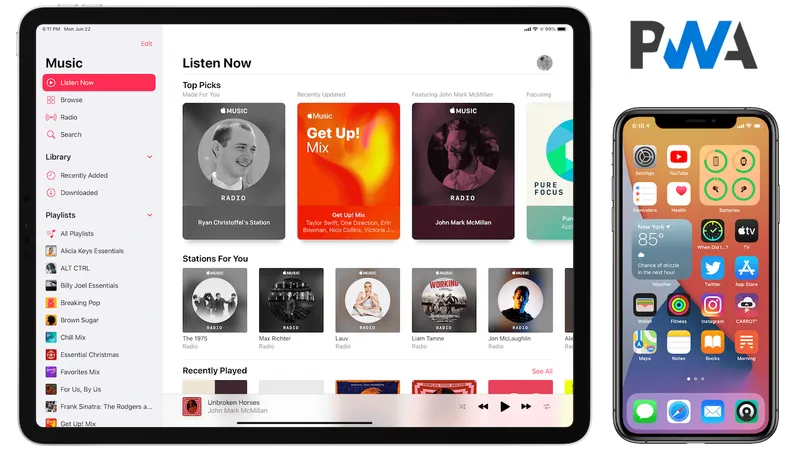
| Criterion | Crickex iOS PWA Protocol | Traditional Third-Party Enterprise App |
|---|---|---|
| Installation Security | Native Safari WebKit Sandbox | Requires untrusted Enterprise Developer profile |
| Certificate Revoke Risk | 0% (Permanent web standard) | High risk (App stops opening every few weeks) |
| Storage Footprint | < 5 MB (Ultra-lightweight cache) | 150 MB - 300 MB |
| Update Requirement | Automatic background synchronization | Manual re-download and re-trust steps |
আইফোনে ক্রিকেক্স যুক্ত করার সহজ ৩টি ধাপ How to Install Crickex on Your iPhone in 3 Simple Steps
আইফোনে মাত্র ৩০ সেকেন্ডে অ্যাপ সেটআপ করার নিয়ম:
- আপনার আইফোনে Safari ব্রাউজার খুলে topcrickex.com-এ প্রবেশ করুন।
- নিচে থাকা Share বাটনে (তীর চিহ্ন সহ চারকোনা বক্স) ট্যাপ করুন।
- অপশনগুলো থেকে একটু নিচে নেমে Add to Home Screen সিলেক্ট করুন।
- নাম হিসেবে "Crickex" রেখে উপরে ডানে Add চাপুন। সাথে সাথেই আপনার আইফোনের হোম স্ক্রিনে সুন্দর একটি গোল্ডেন অ্যাপ আইকন যুক্ত হয়ে যাবে, যা ক্লিক করলে কোনো ব্রাউজার বার ছাড়াই ফুলস্ক্রিনে ওপেন হবে।
Apple iOS users can configure the dedicated web app in less than 30 seconds:
- Open Safari on your iPhone and visit topcrickex.com.
- Tap the Share icon (the square with an upward arrow) located at the bottom center of the Safari browser.
- Scroll down the menu options and tap Add to Home Screen.
- Confirm the name as "Crickex" and tap Add in the top-right corner. The official Crickex gold icon will appear immediately on your iPhone home screen, launching full-screen without any browser address bars.
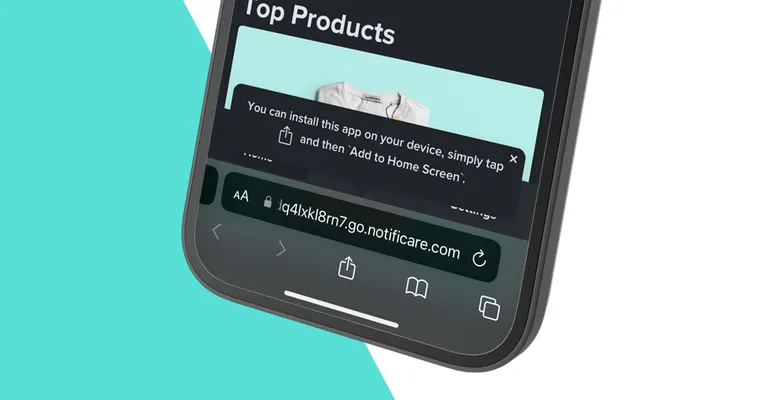
আইওএস-এ প্রোগ্রেসিভ ওয়েব অ্যাপ (PWA): সাফারি ব্রাউজারের মাধ্যমে ১-ক্লিকে ইনস্টল Progressive Web App (PWA) vs Native IPA: Setup via Safari WebKit
অ্যাপলের অ্যাপ স্টোরে বেটিং অ্যাপের সীমাবদ্ধতা থাকায় আইফোন ব্যবহারকারীদের জন্য আধুনিক পিডব্লিউএ (PWA) প্রযুক্তি ব্যবহার করা হয়েছে:
- সাফারি ব্রাউজারের মাধ্যমে সহজ সেটআপ: আইফোনের সাফারি (Safari) ব্রাউজারে topcrickex.com ওপেন করে নিচের Share আইকনে চাপ দিন এবং Add to Home Screen নির্বাচন করুন।
- হোমস্ক্রিনে অ্যাপ আইকন: আপনার আইফোনের হোমস্ক্রিনে একটি রেগুলার অ্যাপের মতোই আইকন যুক্ত হবে, যাতে ব্রাউজারের কোনো অ্যাড্রেস বার থাকবে না এবং সম্পূর্ণ স্ক্রিনে অ্যাপের মতোই চলবে।
- স্বয়ংক্রিয় ক্লাউড আপডেট: কোনো ম্যানুয়াল আপডেট ছাড়াই প্রতিবার খোলার সময় নতুন নতুন ফিচার ও ওডস নিজে থেকেই রিফ্রেশ হয়ে যায়।
Due to Apple App Store restrictions on subcontinental real-money betting platforms, Crickex provides an enterprise-grade Progressive Web App (PWA) for iPhone and iPad users:
- Direct Safari WebKit Engine: Open Safari, navigate to topcrickex.com, tap the Share button (the square icon with an upward arrow), and select Add to Home Screen.
- Native Full-Screen App Experience: Launching the icon from your iOS Home Screen runs Crickex in dedicated standalone mode with no Safari URL bar, full gesture navigation, and hardware FaceID support.
- Instant Cloud Updates: Unlike App Store apps requiring manual downloads, the iOS PWA updates automatically in the background every time the application is opened.
সাধারণ জিজ্ঞাসা ও উত্তর (FAQ) Frequently Asked Questions (FAQ)
হ্যাঁ। আপনার আইফোনে যদি iOS 16.4 বা তার নতুন ভার্সন থাকে, তবে হোম স্ক্রিনে যুক্ত করার পর লাইভ নোটিফিকেশন অন করে নেওয়া যায়।
Yes. On devices running iOS 16.4 or newer, adding Crickex to your Home Screen allows you to toggle Web Push notifications for live cricket scores and cashout updates.
হ্যাঁ। আইওএস ১৬.৪ বা তার পরবর্তী সংস্করণে হোমস্ক্রিন অ্যাপে পুশ নোটিফিকেশন সাপোর্ট করে। প্রম্পট আসলে "Allow" করে দিলেই লাইভ নোটিফিকেশন পাওয়া যায়।
Yes. Starting with iOS 16.4+, Apple enabled web push notifications for PWAs. Simply tap "Allow Notifications" when prompted on your home screen app.
অ্যাপলের কঠোর বিধিনিষেধের কারণে অ্যাপ স্টোরে না থাকলেও আইফোনে পিডব্লিউএ প্রযুক্তির মাধ্যমে চমৎকার চলে।
Apple enforces strict regional restrictions on real-money gaming apps, which is why Crickex provides a high-speed Progressive Web App (PWA).
না। এটি ফোনের মাত্র ১৫ মেগাবাইটের মতো ক্যাশ মেমোরি ব্যবহার করে এবং কোনো ভারি জায়গা দখল করে না।
No. The PWA caches lightweight scripts and uses less than 15 MB of cached storage on your iPhone.
হ্যাঁ। সাফারির মাধ্যমে বায়োমেট্রিক সুবিধা লিঙ্ক হয়ে ফেসআইডি দিয়ে সহজেই প্রবেশ করা যায়।
Yes. Safari WebKit securely bridges biometric authentication, allowing one-tap FaceID verification.